Authentication
The Merion API uses OpenID Connect with ES256-signed JWTs and PKCE S256. This page walks through the full flow: discovery, authorisation, token exchange, validation, and refresh.
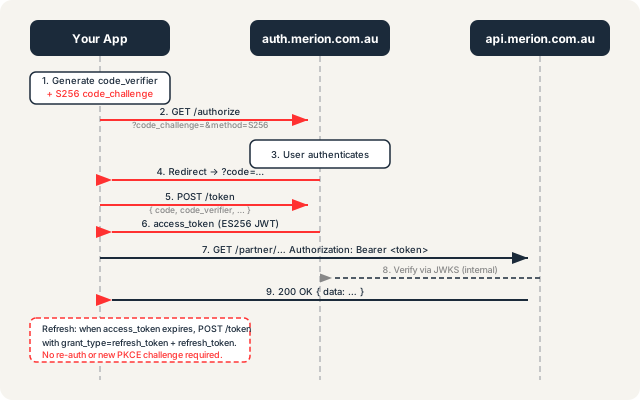
Overview
Merion uses OpenID Connect (OIDC) Core 1.0 for all authenticated API access.
The authorisation server is auth.merion.com.au. Tokens are issued as
ES256 JWTs — signed with ECDSA using the P-256 curve and SHA-256.
The authorisation code flow requires PKCE with the S256 challenge method;
plain challenges are rejected.
Before you start, you need approved credentials — an OIDC client_id issued
by Merion. See Requesting access below.
Step 1 — Fetch the discovery document
Your OIDC library should auto-configure from the discovery document rather than hardcoding endpoint URLs. Fetch it once at startup and cache it:
curl -s https://auth.merion.com.au/.well-known/openid-configuration | python3 -m json.toolKey fields to read from the response:
issuer- The canonical issuer URI. You must validate every incoming JWT's
issclaim against this value. authorization_endpoint- Where to redirect the user to begin the authorisation code flow.
token_endpoint- Where to POST to exchange an authorisation code for tokens, or to refresh an access token.
jwks_uri- The JWKS endpoint — fetch this to get the public keys for verifying JWT signatures.
code_challenge_methods_supported- Will include
"S256". Plain is not listed and will be rejected.
Step 2 — Generate a PKCE code verifier and challenge
PKCE (Proof Key for Code Exchange, RFC 7636) prevents authorisation code interception.
Generate a cryptographically random code_verifier and derive the
code_challenge from it using SHA-256:
# Shell — generate code_verifier (43–128 chars, URL-safe base64, no padding)
CODE_VERIFIER=$(openssl rand -base64 64 | tr -d '=+/' | tr '/+' '_-' | head -c 96)

# Derive code_challenge = BASE64URL(SHA256(code_verifier))
CODE_CHALLENGE=$(echo -n "$CODE_VERIFIER" | openssl dgst -sha256 -binary | openssl base64 | tr -d '=' | tr '+/' '-_')
In JavaScript/TypeScript (Node 18+ or browser with Web Crypto):
async function generatePKCE() {
  // code_verifier: 96 random URL-safe chars
  const array = new Uint8Array(72);
  crypto.getRandomValues(array);
  const verifier = btoa(String.fromCharCode(...array))
    .replace(/\+/g, "-").replace(/\//g, "_").replace(/=/g, "");

  // code_challenge: S256 = BASE64URL(SHA256(verifier))
  const encoder = new TextEncoder();
  const data = encoder.encode(verifier);
  const digest = await crypto.subtle.digest("SHA-256", data);
  const challenge = btoa(String.fromCharCode(...new Uint8Array(digest)))
    .replace(/\+/g, "-").replace(/\//g, "_").replace(/=/g, "");

  return { verifier, challenge };
}
Store the verifier securely (session storage or server-side session).
You will need it at step 4. Never expose the verifier in a URL or log.
Step 3 — Redirect to the authorisation endpoint
Redirect the user's browser to the authorization_endpoint from the discovery
document with these query parameters:
response_type=code- Request an authorisation code.
client_id=YOUR_CLIENT_ID- Your OIDC client ID issued by Merion.
redirect_uri=https://yourapp.example.com/callback- Must exactly match a URI registered with Merion during onboarding.
scope=openid- Include
openidas a minimum. Additional scopes are granted per-client. code_challenge=CODE_CHALLENGE- The S256 challenge from step 2.
code_challenge_method=S256- Must be
S256. Plain is rejected. state=RANDOM_STATE- A CSRF token — a random string you generate and verify on return.
const params = new URLSearchParams({"
  response_type: "code",
  client_id: "YOUR_CLIENT_ID",
  redirect_uri: "https://yourapp.example.com/callback",
  scope: "openid",
  code_challenge: challenge,
  code_challenge_method: "S256",
  state: csrfToken,
});
window.location.href = `${authorizationEndpoint}?${params}`;
Step 4 — Exchange the authorisation code for tokens
After the user authenticates, auth.merion.com.au redirects back to your
redirect_uri with ?code=AUTH_CODE&state=STATE.
Verify the state matches what you sent, then POST to the
token_endpoint:
curl -s -X POST \
  -H "Content-Type: application/x-www-form-urlencoded" \
  -d "grant_type=authorization_code" \
  -d "code=AUTH_CODE" \
  -d "redirect_uri=https://yourapp.example.com/callback" \
  -d "client_id=YOUR_CLIENT_ID" \
  -d "code_verifier=CODE_VERIFIER" \
  "$(TOKEN_ENDPOINT)"
A successful response:
{
  "access_token": "eyJhbGciOiJFUzI1NiIsInR5cCI6IkpXVCJ9…",
  "token_type": "Bearer",
  "expires_in": 3600,
  "refresh_token": "rt_…",
  "id_token": "eyJhbGciOiJFUzI1NiIsInR5cCI6IkpXVCJ9…"
}
Step 5 — Validate the access token
Before trusting any JWT, validate:
- Fetch the JWKS from
jwks_uriin the discovery document. Cache the key set with a sensible TTL (e.g., 24 hours); re-fetch if you encounter an unknownkid. - Verify the signature using the matching public key (
kidin the JWT header must match a key in the JWKS). - Check
issequals theissuerfrom the discovery document exactly. - Check
audincludes yourclient_id. - Check
expis in the future (account for a small clock skew, e.g., ±30 seconds).
Use a battle-tested library for this — do not implement JWT validation from scratch.
Any library that supports ES256 and fetches JWKS by URI will work
(e.g., jose for Node.js/browser, python-jose for Python,
System.IdentityModel.Tokens.Jwt for .NET).
Step 6 — Call authenticated endpoints
Include the access token in every request to a protected endpoint:
curl -s \
  -H "Authorization: Bearer ACCESS_TOKEN" \
  https://api.merion.com.au/me
The API validates the bearer token on every request. A missing or invalid token returns
401 Unauthorized; a valid token with insufficient scope returns
403 Forbidden.
Token refresh
Access tokens are short-lived (the expires_in field is authoritative —
do not hardcode a duration). When the access token expires, use the refresh token
to obtain a new one without re-authenticating the user:
curl -s -X POST \
  -H "Content-Type: application/x-www-form-urlencoded" \
  -d "grant_type=refresh_token" \
  -d "refresh_token=REFRESH_TOKEN" \
  -d "client_id=YOUR_CLIENT_ID" \
  "$(TOKEN_ENDPOINT)"
The response has the same shape as the initial token response. Store the new
refresh_token if one is returned — some servers rotate refresh tokens.
CORS policy
The API accepts cross-origin requests from *.merion.com.au origins only.
If your integration runs in a browser on a third-party domain, you must
proxy API calls through your own server — direct browser requests will be blocked by
the browser's CORS preflight. The token exchange should always happen server-side.
Requesting access
There is no self-service sign-up. All integrations are reviewed before credentials are issued:
- Email [email protected] with the subject "API Access Request".
- Describe your use case, the integration you are building, and your existing relationship with Merion (partner, client, integrator).
- The Merion team will respond within two business days and, if your use case is approved, initiate the partner onboarding flow.
- On approval you will receive an OIDC
client_idand the list ofredirect_urivalues to register.
See also: Integration Checklist for the full pre-launch sequence, and Errors & Rate Limits for how authentication errors are surfaced.
Ready to integrate with Merion?
API access is available to approved partners and integrators. Contact us to start the conversation — no commitment required.