Merion API
Integration Checklist
A practical pre-launch checklist for partners and integrators building on the Merion API. Work through each phase before going live.
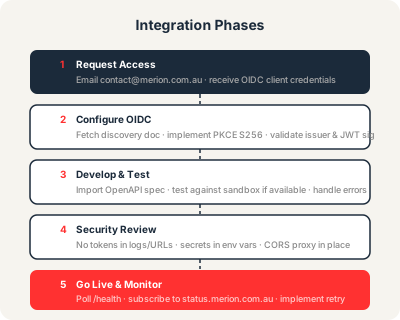
Phase 1 — Request access
- Email [email protected] with subject "API Access Request".
- Include your use case, the integration you are building, and your relationship to Merion.
- Await approval — the team responds within two business days.
- On approval: receive your OIDC
client_idand onboarding steps. - Confirm your
redirect_urivalues are registered with Merion before starting development.
Phase 2 — Configure OIDC
- Fetch the discovery document from
https://auth.merion.com.au/.well-known/openid-configuration. - Configure your OIDC library using the discovered endpoint URLs — do not hardcode them.
- Implement PKCE with
S256(SHA-256 code challenge method). Confirm plain is rejected. - Validate
iss,aud,exp, and JWT signature on every access token you receive. - Fetch the JWKS from
jwks_uriand cache keys with a sensible TTL. Implement re-fetch on unknownkid. - Implement token refresh using the
refresh_tokengrant before the access token expires. - Confirm that
401responses trigger token refresh or re-authentication, not a crash.
Phase 3 — Develop and test
- Download the OpenAPI spec:
curl -s https://api.merion.com.au/openapi.yaml -o merion-openapi.yaml. - Import the spec into Postman or Insomnia and confirm all target endpoints are listed.
- Test each endpoint you will use with real credentials in the sandbox (if provided by Merion during onboarding).
- Exercise the Forms API for each key your integration will submit: verify success responses and validate that field-level errors surface correctly.
- Deliberately trigger a
422validation error and confirm your code surfaceserror.detailsto the user. - Deliberately trigger a
429rate-limit response and confirm your retry logic honours theRetry-Afterheader. - Test with an expired token and confirm refresh is triggered automatically.
- Test the health check:
curl -s https://api.merion.com.au/healthshould return{"status":"ok"}.
Phase 4 — Security review
- Confirm no tokens,
client_secret, or credentials appear in browser URLs, query strings, or client-side JavaScript bundles. - Confirm no tokens are written to application logs.
- Store credentials (client ID, refresh tokens) in environment variables or a secrets manager — not in source code or version control.
- If your integration runs in a browser, confirm all token exchange and authenticated API calls are proxied through your server. Direct browser calls to
api.merion.com.aufrom non-*.merion.com.auorigins will be blocked by CORS. - Confirm the
stateparameter is validated on the OIDC callback to prevent CSRF. - Confirm the
hp(honeypot) field is always sent as an empty string in Forms API submissions — never populated from user input. - Confirm error messages shown to end users do not expose internal tokens, stack traces, or implementation details.
Phase 5 — Go live and monitor
- Subscribe to the status page at status.merion.com.au for email notifications of incidents and maintenance windows.
- Add
GET https://api.merion.com.au/healthto your uptime monitoring. Alert on non-200 responses after 2–3 consecutive failures. - Implement exponential back-off with jitter for retriable errors (429, 500, 503).
- Log API errors (with sanitised payloads — no tokens) so you can diagnose issues post-launch.
- Re-fetch the OpenAPI spec periodically and re-run client generation to catch any API surface changes.
- Notify your Merion account contact before any significant change to your integration (new endpoints, increased volume, new redirect URIs).
If something goes wrong
If your integration encounters unexpected errors after launch:
- Check status.merion.com.au for any active incidents.
- Review the Errors & Rate Limits page to confirm the error is not expected behaviour.
- If there is no active incident and the error is unexpected, email [email protected] with subject "API Incident", including the timestamp (UTC), endpoint, request (sanitised), and response.
See Status & Support for full support contact details.
Get started
Ready to integrate with Merion?
API access is available to approved partners and integrators. Contact us to start the conversation — no commitment required.