Errors & Rate Limits
Every Merion API error follows the same envelope. This page covers all error codes, HTTP status meanings, rate-limit behaviour, and retry strategies.
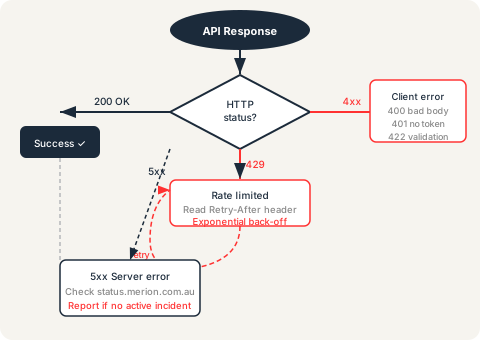
Error envelope
All error responses return a JSON body in this shape, regardless of the endpoint or error type:
{
  "error": {
    "code":    "VALIDATION_ERROR",
    "message": "Human-readable description safe to show a user.",
    "details": {
      "email":   "A valid email address is required.",
      "message": "Message must be at least 10 characters."
    }
  }
}error.code(string)- Machine-readable error code. Always present. Use this to branch your error-handling logic — do not parse
message. error.message(string)- Human-readable summary. Safe to display directly to a user. May change between API versions.
error.details(object, optional)- Field-level validation errors. Keys are field names from the request body; values are error descriptions. Only present for
VALIDATION_ERRORresponses.
Error codes
VALIDATION_ERROR- The request body failed field-level validation. Check
error.detailsfor which fields are invalid and why. Fix the payload and retry immediately — no back-off needed. FORM_NOT_FOUND- The form key in the URL path does not exist. Check the key against the Forms API reference. Valid keys:
contact,refer-a-debt,request-a-quote,partner-referral,become-a-partner. RATE_LIMITED- Too many requests from this IP or token within the rate-limit window. See the Rate limits section.
UNAUTHORIZED- Missing or invalid bearer token on a protected endpoint. Check that the
Authorization: Bearer <token>header is present and the token has not expired. FORBIDDEN- Valid token but insufficient scope. The authenticated client does not have permission to access this endpoint. Contact Merion to review your granted scopes.
NOT_FOUND- The requested route or resource does not exist. Check the URL against the API Reference.
SERVER_ERROR- Unexpected internal server error. This is a Merion-side fault. Retry with exponential back-off. If the error persists, report it — see Status & Support.
HTTP status codes
200 OK- The request succeeded. For the Forms API, check the response body for
data.redirectto determine whether to redirect the user. 400 Bad Request- Malformed request — usually invalid JSON, a missing
Content-Type: application/jsonheader, or a body that cannot be parsed. Fix the request before retrying. 401 Unauthorized- No valid bearer token. Either include
Authorization: Bearer <token>or refresh an expired token before retrying. 403 Forbidden- Token is valid but the client lacks the required scope. Do not retry automatically — this requires a scope change from Merion.
404 Not Found- Route does not exist. Check the URL. Do not retry.
422 Unprocessable Entity- Validation failed. The
error.detailsobject lists every failing field. Fix the payload and retry. 429 Too Many Requests- Rate limit exceeded. Back off before retrying. See the
Retry-Afterheader. 500 Internal Server Error- Unexpected server error. Retry with exponential back-off. Report if persistent.
503 Service Unavailable- The API is temporarily unavailable (maintenance or incident). Check status.merion.com.au and retry after the incident resolves.
Rate limits
Rate limits are applied per API token (for authenticated endpoints) or per source IP (for public endpoints such as the Forms API). Specific limits are not published — they are calibrated to well-behaved integrations and are subject to change.
When a rate limit is exceeded, the API returns 429 Too Many Requests with
an error body of:
{
  "error": {
    "code":    "RATE_LIMITED",
    "message": "Too many requests. Please slow down."
  }
}
The Retry-After HTTP response header is included when available.
Its value is the number of seconds to wait before retrying:
HTTP/1.1 429 Too Many Requests
Retry-After: 30
Content-Type: application/json

{"error":{"code":"RATE_LIMITED","message":"Too many requests. Please slow down."}}
Retry strategy
Use exponential back-off with jitter for all retriable errors (429, 500, 503, and network failures). Never poll in a tight loop.
async function withRetry(fn, maxAttempts = 4) {
  let attempt = 0;
  while (attempt < maxAttempts) {
    try {
      return await fn();
    } catch (err) {
      attempt++;
      const retriable = [429, 500, 503].includes(err.status);
      if (!retriable || attempt >= maxAttempts) throw err;

      // Honour Retry-After if present, otherwise exponential back-off with jitter
      const retryAfter = err.retryAfter ?? null;
      const baseMs = retryAfter
        ? retryAfter * 1000
        : Math.min(1000 * 2 ** attempt, 30000);
      const jitter = Math.random() * 1000;
      await new Promise(r => setTimeout(r, baseMs + jitter));
    }
  }
}
What not to retry
400 Bad Request— fix the payload, do not retry as-is.401 Unauthorized— refresh or re-obtain a token first.403 Forbidden— a scope issue; retrying will not help.404 Not Found— the route does not exist.422 Unprocessable Entity— fix the validation errors first.
Health check before batch operations
For batch jobs (e.g., submitting many form entries overnight), check
GET /health before starting the batch.
If the health check fails, queue submissions for later rather than losing data.
const health = await fetch("https://api.merion.com.au/health");
const { status } = await health.json();
if (status !== "ok") {
  console.warn("API not healthy — deferring batch");
  return;
}
See also: Status & Support for how to report persistent errors, and Integration Checklist for pre-launch validation steps.
Ready to integrate with Merion?
API access is available to approved partners and integrators. Contact us to start the conversation — no commitment required.